Yes, there are quite a few ways of doing that. If you are looking for a AJAX toolkit for .Net Framework 1.1 then you should have a look at AJAX.NET . It is a very popular free AJAX library compatible with version 1.1 of the .Net Framework. It has been written in C#. There is a quick guide (really quick) available from its site. All you need to do is to register the HttpHandler in your web.config from the *.dll supplied and mark your methods in code-behind as '[AjaxPro.AjaxMethod]' . Then you can directly call these functions from client side javascript , using their names !
You can download AJAX.NET from this site http://www.ajaxpro.info/default.aspx.
Frankly, to do AJAX you really don’t need a library or even a language(like ASP ,PHP,JSP) as such. There is a great article on Mozilla's developer site that shows how to do AJAX using only your web browser and javascript (yes that’s all !). Server side programming is required to fetch data for the AJAX call, it does not make AJAX possible. It is the XMLHTTP object built inside modern browsers that does the trick.
Read the article titled AJAX:Getting Started
Comments and criticism will be highly appreciated :-)
Friday, July 07, 2006


Sunday, June 25, 2006
Articles Moved !
Hi ,
Couple of articles from my blog have been moved to my homesite www.ashishware.com.
These include:
- Transliteration Tools for Indian Languages
http://ashishware.com/Transl.shtml - Running Linux on Windows Like Normal Programs
http://ashishware.com/LinuxOnWindows.shtml
There is also an article on Making Animated Collapsible Panel Using Javascript and online demo of these panel.
Bookmark the site www.ashishware.com for new stuff.From now on updates and newer techincal articles will not be posted here. This blog will be maintained for non-techincal stuff.
Saturday, June 03, 2006
Creating PDFs with Apache FOP
FOP (Formatting Objects Processor) is from the apache group.It is said to be the worlds first print formatter driven by XSL formatting objects (XSL-FO) and the world's first output independent formatter. Actually it isn’t a tool for specifically meant for PDF conversion or creation.FOP can be downloaded here.
But, its ability to convert XSL files (*.fo) to PDF certainly makes it worth mention . Basically FOP is great for template based PDF generation. Simple programs can fetch data from any data source and populate such a template , and generate PDF’s on fly !
Its not that it is not very flexible, but generation XSL files for complex PDF’s can be a big pain. It is a Java application that reads a formatting object (FO) tree and renders the resulting pages to a specified output.It comes with nice documentation and samples that get you started within minutes.
Before you start using FOP, you should have look at samples in \examples\fo\ folders particularly \examples\fo\basic.I think you will learn things more quickly than reading the reference document (xslfoRef.pdf). Given below is a very simple *.fo file that includes a heading,some text,hyperlink , table and a image.
Save this in a file called test.fo. Now run fop.bat (or fop.sh on Unix/Linux)
<?xml version="1.0" ?>
<fo:root xmlns:fo="http://www.w3.org/1999/XSL/Format">

<!-- defines the layout master -->
<fo:layout-master-set>
 <fo:simple-page-master master-name="first"
                           page-height="29.7cm"
                           page-width="21cm"
                           margin-top="1cm"
                           margin-bottom="2cm"
                           margin-left="2.5cm"
                           margin-right="2.5cm">
          <fo:region-body margin-top="1cm" margin-bottom="1.5cm"/>
         <fo:region-before extent="3cm"/>
        <fo:region-after extent="1.5cm"/>
     </fo:simple-page-master>
 </fo:layout-master-set>

<!-- starts actual layout -->
<fo:page-sequence master-reference="first">
<fo:flow flow-name="xsl-region-body">

<!-- Heading -->
<fo:block font-family="Helvetica" background-color="blue"
color="white" text-align="center" font-size="14pt">
FOP Demonstration
</fo:block>

 <!-- Image-->
<fo:block space-before.optimum="20pt">
<fo:external-graphic src="url(test.jpg)"/>
</fo:block>

 <!-- Hyperlink -->
<fo:block space-before.optimum="10pt" text-align="left" >
You can download FOP here:
<fo:basic-link external-destination="www.apache.org" text-decoration="underline" color="blue">
 www.apache.org
</fo:basic-link>
</fo:block>

  <!-- table start -->
<fo:block space-before.optimum="10pt" >A Table</fo:block>
<fo:table table-layout="fixed" border-width="0.1mm" border-style="solid" background-color="yellow">
<fo:table-column column-width="50mm"/>
<fo:table-column column-width="50mm"/>
<fo:table-column column-width="50mm"/>
<fo:table-body>
<fo:table-row>
 <fo:table-cell border-style="solid" ><fo:block>good</fo:block></fo:table-cell>
 <fo:table-cell border-style="solid"><fo:block>bad</fo:block></fo:table-cell>
 <fo:table-cell border-style="solid"><fo:block>ugly</fo:block></fo:table-cell>
 </fo:table-row>
<fo:table-row>
               <fo:table-cell border-style="solid"><fo:block>nice</fo:block></fo:table-cell>
               <fo:table-cell border-style="solid"><fo:block>dice</fo:block></fo:table-cell>
               <fo:table-cell border-style="solid"><fo:block>vice</fo:block></fo:table-cell>
</fo:table-row>
<fo:table-row>
   <fo:table-cell border-style="solid"><fo:block>literature</fo:block></fo:table-cell>
           <fo:table-cell border-style="solid"><fo:block>music</fo:block></fo:table-cell>
                <fo:table-cell border-style="solid"><fo:block>art</fo:block></fo:table-cell>
 </fo:table-row>
<fo:table-row>
             <fo:table-cell border-style="solid"><fo:block>java</fo:block></fo:table-cell>
             <fo:table-cell border-style="solid"><fo:block>perl</fo:block></fo:table-cell>
             <fo:table-cell border-style="solid"><fo:block>python</fo:block></fo:table-cell>
</fo:table-row>
</fo:table-body>
</fo:table>
<!-- table end -->
</fo:flow>
 </fo:page-sequence>
</fo:root>
: >fop.bat test.fo test.pdf
The test PDF in this example will look like this :
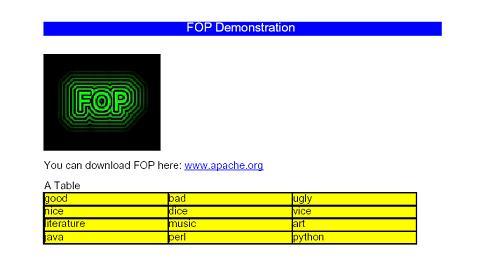
FOP is ideal for generation of simple PDF's from templates. It is a powerful alternative for server side PDF creation in all platforms supporting Java.
Tuesday, May 23, 2006
Adding an ‘online’ indicator to your email signatures and blogs.
It is very easy to add an icon showing your online status (on yahoo messenger and AIM) to your email signatures and blogs.
Edit your email signature and modify the content as follows(Make sure to use HTML view):
<font face=Tahoma size=2>
<strong>Ashish Patil</strong><BR>
Consultant (.NET Technologies)<BR>
yahoo id: your yahoo id
<a href="http://edit.yahoo.com/config/send_webmesg?.target=[your_yahoo_id]&.src=pg">
<img border=0 src="http://opi.yahoo.com/online?u=[your_yahoo_id]&m=g&t=0"></a><BR>
<A href="http://ashishpatil.blogspot.com">
ashishpatil.blogspot.com</A>
</font>
If you sent an email using this signature you should see something like this. To the right is small icon that shows your online status .

The lines to watch out are:
<a hrefhttp://edit.yahoo.com/config/send_webmesg?.target=[your_yahoo_id]&.src=pg >
<img border=0 src="http://opi.yahoo.com/online?u=[ your_yahoo_id]&m=g&t=0"></a>
Look at the ‘src’ attribute closely . In place of 0 , if we pass other values we get different images.


AIM users can use this technique to display if they are online or not:
<img
src="http://big.oscar.aol.com/[screenname]?on_url=[Online_Image_URL]&off_url=[Online_Image_URL]"
border = 0 >
But the disadvantage here is that you can't click on the image and send a message to user. AOL seems to have a nice API for doing what we want here http://developer.aim.com/faq.jsp#presence
I tried doing same with Microsoft Outlook signatures , but it doesn't work. Outlook seems to be replacing the URL with copy of image from its cache. I am looking for a workaround to accomplish it.
Note : Many email clients/services dont show images by default.You may have to click on 'download images' or 'show images' hyperlink.
Enjoy !
Edit your email signature and modify the content as follows(Make sure to use HTML view):
<font face=Tahoma size=2>
<strong>Ashish Patil</strong><BR>
Consultant (.NET Technologies)<BR>
yahoo id: your yahoo id
<a href="http://edit.yahoo.com/config/send_webmesg?.target=[your_yahoo_id]&.src=pg">
<img border=0 src="http://opi.yahoo.com/online?u=[your_yahoo_id]&m=g&t=0"></a><BR>
<A href="http://ashishpatil.blogspot.com">
ashishpatil.blogspot.com</A>
</font>
If you sent an email using this signature you should see something like this. To the right is small icon that shows your online status .

The lines to watch out are:
<a hrefhttp://edit.yahoo.com/config/send_webmesg?.target=[your_yahoo_id]&.src=pg >
<img border=0 src="http://opi.yahoo.com/online?u=[ your_yahoo_id]&m=g&t=0"></a>
Look at the ‘src’ attribute closely . In place of 0 , if we pass other values we get different images.


AIM users can use this technique to display if they are online or not:
<img
src="http://big.oscar.aol.com/[screenname]?on_url=[Online_Image_URL]&off_url=[Online_Image_URL]"
border = 0 >
But the disadvantage here is that you can't click on the image and send a message to user. AOL seems to have a nice API for doing what we want here http://developer.aim.com/faq.jsp#presence
I tried doing same with Microsoft Outlook signatures , but it doesn't work. Outlook seems to be replacing the URL with copy of image from its cache. I am looking for a workaround to accomplish it.
Note : Many email clients/services dont show images by default.You may have to click on 'download images' or 'show images' hyperlink.
Enjoy !
Wednesday, May 17, 2006
Dojo : First Impressions
There is a lot of talk about Web 2.0 . Toolkits like Dojo are going to play major role in it. We have already seen awesome applications of AJAX( google maps !) and javascript (http://www.live.com/) to create desktop like web applications.I found Dojo on DeveloperIQ (May 2006) magazine CD.I have been looking for something very similar since long. In fact I was also trying to create simple draggable HTML control.
First , let me admit that Dojo has almost everything I needed. It has a nice library of javascript widgets. My favoirte widget is the 'FloatingPane' that enables you to create a window like container , that is draggable , has minimize/maximize buttons and cool shadows.It can contain more widgets and text.Another awesome widget is 'FisheyeList' .It is basically a toolbar, but when you move your cursor over any icon, the corresponding icon pops out like an fish eye!The tree control in one more interesting control I tried out. There is very scanty documentation available on their web site, more can be expected as the project grows.There is always a way of finding out functionality ......going though the source code !
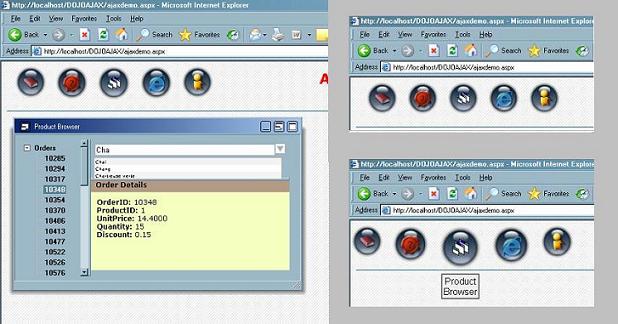
FloatingPane Widget whit tree control(left) and 'FisheyeList' control in action(right)
Google has just released it AJAX toolkit , which it claims works only with JAVA. Microsoft's ATLAS , I have heard is somewhat coupled with .NET 2.0.What I personally like about Dojo is that it is neutral to server side development enviornment.
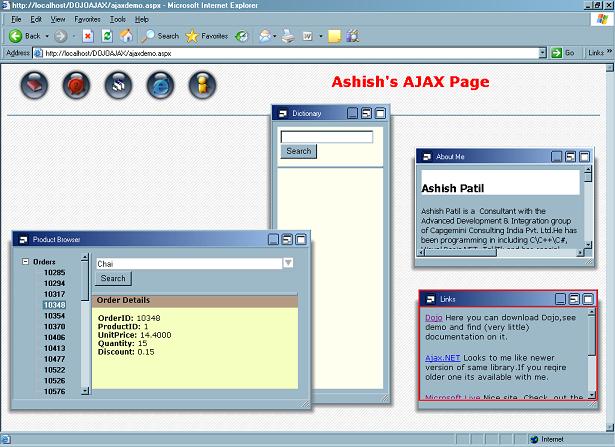
The desktop look ! (Dojo widgets on a web page)
Also the toolkit does seem to 'perform' with IE and Firefox .All developers irrespective of language they are developing (JSP,PHP...) can benifit from Dojo.
I personally feel that , with web-development becoming more and more complex , the days of such toolkits have arrived. If you are into serious web-application development and looking for a light-weight, multiple browser compliant, pure JavaScript, standalone toolkit ...then Dojo is
for you!
Subscribe to:
Posts (Atom)